

Hi — what would you like your resume to become today? Tell me your goal and I’ll pick the right skills and work on it with you.Say what you need in plain words; it does the work.
Set up AI (once signed in)
Once signed in, AI runs on the backend — power it one of two ways:Use internal credits
Signed-in accounts get some free quota; when it runs out, add credits / subscribe to Pro for more. Your remaining quota is in the account menu.
Use your own key
Go to Settings → Model Configuration and paste your own API key (OpenAI / Anthropic / Gemini, etc.). The key is stored only in your local browser, never uploaded.
If neither is set, AI pauses and shows “Account credits are unavailable” — do one of the two above to continue.
Five things it can do
Just say it in AI Lab, or click the matching suggestion:Create from scratch
“Walk me through building a resume from zero” — a Q&A builds your first draft.
Tailor to a job
Paste a target JD / company / role and it reshapes your resume to fit.
Deep analysis (a score)
Three virtual interviewers score your resume and flag strengths and gaps.
Translate
Translate the whole resume into English / Japanese / Korean / French, etc.
Mock interview
Run a round of Q&A based on your resume.
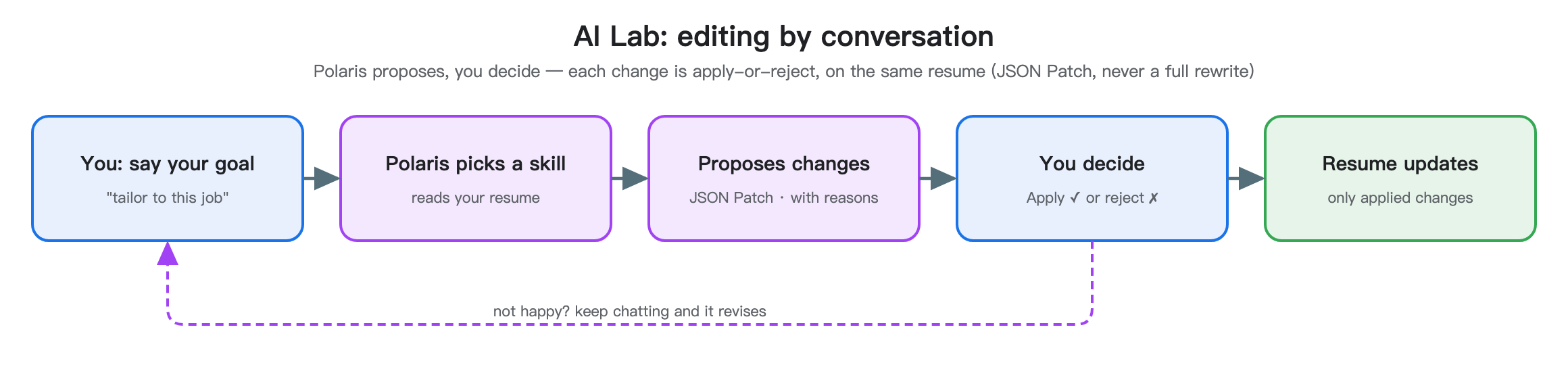
Key: changes are proposals — you decide
This is a Magic Resume principle — AI is a collaborator, not autopilot:- In place, not in a separate window: with the Live canvas, AI marks what to change right on your resume on the right.
- Proposed first, rejectable: every change is shown with a reason; you can Apply to resume or skip it. The top shows “N changes pending”.
- New chat anytime: click New chat to clear the current session and start over (this clears this resume’s AI history and analysis, and can’t be undone).