> ## Documentation Index
> Fetch the complete documentation index at: https://docs.magic-resume.cn/llms.txt
> Use this file to discover all available pages before exploring further.
# 接入 AI 编程工具(MCP)
> 进阶玩法——在 Claude Code、Cursor 等工具里直接读改你的 Magic Resume 简历。
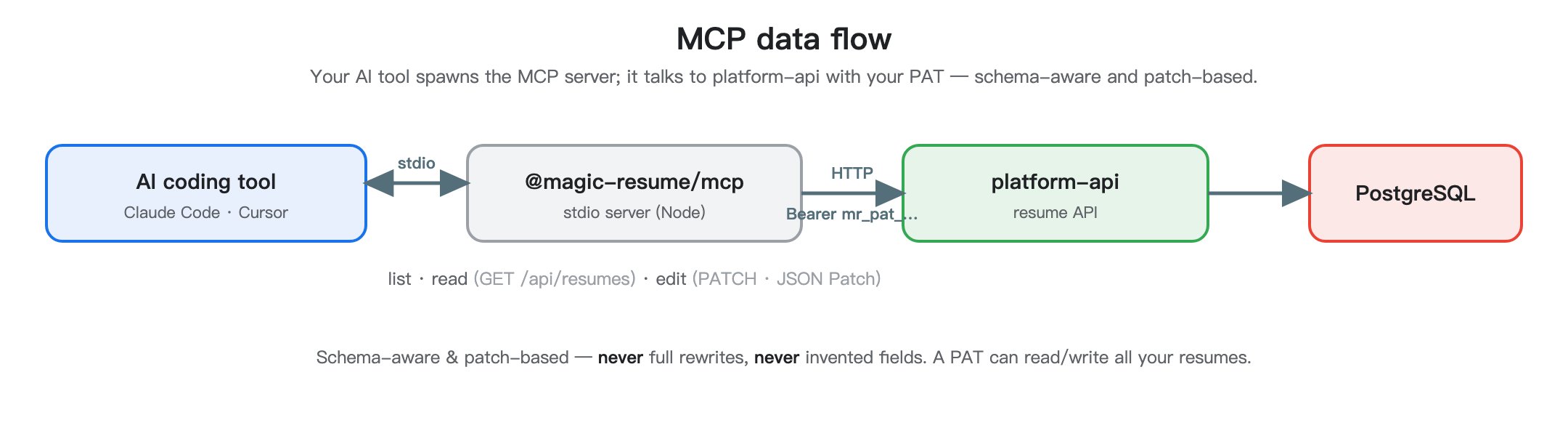
如果你在用 **Claude Code**、**Cursor** 这类 AI 编程工具,可以把 Magic Resume 接进去,让 AI 直接**读你的简历、按你的话安全地改**——用的是和网页版同一套数据。
 这是**进阶功能**,面向会用命令行/AI 编程工具的人。只想在网页里做简历的话,完全用不到这页。
它通过 **MCP**(一个标准协议)跑一个小程序,由你的 AI 工具在本地拉起。两步:配一次凭证,再注册到每个工具。
在网页版 **设置 → 个人访问令牌 → 创建**,复制那串 `mr_pat_…`(只显示一次)。见 [设置](/zh/guide/settings)。
```bash theme={null}
npx -y @magic-resume/mcp config set \
--api-url "https://api.magic-resume.cn/api" \
--pat "mr_pat_xxx"
```
这会写入 `~/.magic-resume/mcp.json`。如果你本地跑了后端,把 `--api-url` 指向 `http://localhost:3110/api`(Core 网关)。
```bash theme={null}
claude mcp add magic-resume -- npx -y @magic-resume/mcp mcp
```
这会把 Magic Resume 加进用户级 MCP 列表。重启 Claude Code 让它读到新服务器。
打开 `~/.cursor/mcp.json`(没有就创建),加:
```json theme={null}
{
"mcpServers": {
"magic-resume": {
"command": "npx",
"args": ["-y", "@magic-resume/mcp", "mcp"]
}
}
}
```
任何支持 stdio MCP 服务器的客户端都可以拉起它:
```bash theme={null}
npx -y @magic-resume/mcp mcp
```
服务器通过 stdin/stdout 说标准 MCP 协议 —— 不需要传任何标志。
在你的 AI 工具里问:"列出我的 Magic Resume 简历。" 模型应该会调用工具、返回你的简历列表。报错的话,运行 `npx -y @magic-resume/mcp config print` 确认 API 地址和 PAT 对不对。
AI 工具改简历也是**基于 schema、走 JSON Patch** 的——不会整份重写、不会瞎编字段。但它拿着你的 PAT 能读写全部简历,所以 PAT 一定保管好。
想了解 MCP 内部怎么实现、有哪些工具?那属于开发内容,见 [开发手册的 MCP 章节](/zh/mcp)。
这是**进阶功能**,面向会用命令行/AI 编程工具的人。只想在网页里做简历的话,完全用不到这页。
它通过 **MCP**(一个标准协议)跑一个小程序,由你的 AI 工具在本地拉起。两步:配一次凭证,再注册到每个工具。
在网页版 **设置 → 个人访问令牌 → 创建**,复制那串 `mr_pat_…`(只显示一次)。见 [设置](/zh/guide/settings)。
```bash theme={null}
npx -y @magic-resume/mcp config set \
--api-url "https://api.magic-resume.cn/api" \
--pat "mr_pat_xxx"
```
这会写入 `~/.magic-resume/mcp.json`。如果你本地跑了后端,把 `--api-url` 指向 `http://localhost:3110/api`(Core 网关)。
```bash theme={null}
claude mcp add magic-resume -- npx -y @magic-resume/mcp mcp
```
这会把 Magic Resume 加进用户级 MCP 列表。重启 Claude Code 让它读到新服务器。
打开 `~/.cursor/mcp.json`(没有就创建),加:
```json theme={null}
{
"mcpServers": {
"magic-resume": {
"command": "npx",
"args": ["-y", "@magic-resume/mcp", "mcp"]
}
}
}
```
任何支持 stdio MCP 服务器的客户端都可以拉起它:
```bash theme={null}
npx -y @magic-resume/mcp mcp
```
服务器通过 stdin/stdout 说标准 MCP 协议 —— 不需要传任何标志。
在你的 AI 工具里问:"列出我的 Magic Resume 简历。" 模型应该会调用工具、返回你的简历列表。报错的话,运行 `npx -y @magic-resume/mcp config print` 确认 API 地址和 PAT 对不对。
AI 工具改简历也是**基于 schema、走 JSON Patch** 的——不会整份重写、不会瞎编字段。但它拿着你的 PAT 能读写全部简历,所以 PAT 一定保管好。
想了解 MCP 内部怎么实现、有哪些工具?那属于开发内容,见 [开发手册的 MCP 章节](/zh/mcp)。