> ## Documentation Index
> Fetch the complete documentation index at: https://docs.magic-resume.cn/llms.txt
> Use this file to discover all available pages before exploring further.
# Connect AI coding tools (MCP)
> Advanced — read and edit your Magic Resume resumes right inside Claude Code, Cursor, and similar tools.
If you use AI coding tools like **Claude Code** or **Cursor**, you can plug Magic Resume in so the AI can **read your resumes and safely edit them on your instructions** — using the same data layer as the web app.
 This is an **advanced feature** for people comfortable with the command line / AI coding tools. If you only make resumes in the browser, you don't need this page.
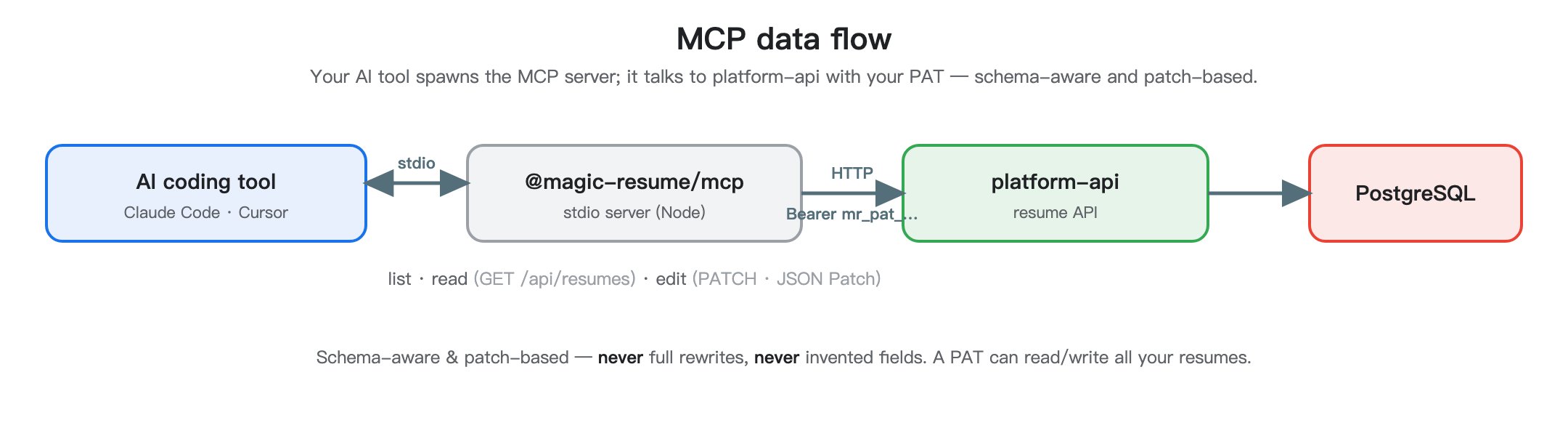
It runs a small program over **MCP** (a standard protocol), spawned locally by your AI tool. Two steps: configure credentials once, then register it with each tool.
In the web app, **Settings → Personal Access Tokens → Create**, and copy the `mr_pat_…` value (shown once). See [Settings](/en/guide/settings).
```bash theme={null}
npx -y @magic-resume/mcp config set \
--api-url "https://api.magic-resume.cn/api" \
--pat "mr_pat_xxx"
```
This writes `~/.magic-resume/mcp.json`. If you run the backend locally, point `--api-url` at `http://localhost:3110/api` (the Core gateway).
```bash theme={null}
claude mcp add magic-resume -- npx -y @magic-resume/mcp mcp
```
This adds Magic Resume to the user-scoped MCP list. Restart Claude Code so it picks up the new server.
Open `~/.cursor/mcp.json` (create if missing) and add:
```json theme={null}
{
"mcpServers": {
"magic-resume": {
"command": "npx",
"args": ["-y", "@magic-resume/mcp", "mcp"]
}
}
}
```
Any MCP client that supports stdio servers can spawn it:
```bash theme={null}
npx -y @magic-resume/mcp mcp
```
The server speaks the standard MCP protocol over stdin/stdout — no flags needed.
In your AI tool, ask: "List my Magic Resume resumes." The model should call the tool and return your list. If it errors, run `npx -y @magic-resume/mcp config print` and check the API URL and PAT.
AI tools edit resumes the same safe way — **schema-aware, via JSON Patch** — never full rewrites, never invented fields. But the PAT lets it read/write all your resumes, so keep it safe.
Curious how MCP works internally and which tools exist? That's developer material — see the [MCP section of the Developer Handbook](/en/mcp).
This is an **advanced feature** for people comfortable with the command line / AI coding tools. If you only make resumes in the browser, you don't need this page.
It runs a small program over **MCP** (a standard protocol), spawned locally by your AI tool. Two steps: configure credentials once, then register it with each tool.
In the web app, **Settings → Personal Access Tokens → Create**, and copy the `mr_pat_…` value (shown once). See [Settings](/en/guide/settings).
```bash theme={null}
npx -y @magic-resume/mcp config set \
--api-url "https://api.magic-resume.cn/api" \
--pat "mr_pat_xxx"
```
This writes `~/.magic-resume/mcp.json`. If you run the backend locally, point `--api-url` at `http://localhost:3110/api` (the Core gateway).
```bash theme={null}
claude mcp add magic-resume -- npx -y @magic-resume/mcp mcp
```
This adds Magic Resume to the user-scoped MCP list. Restart Claude Code so it picks up the new server.
Open `~/.cursor/mcp.json` (create if missing) and add:
```json theme={null}
{
"mcpServers": {
"magic-resume": {
"command": "npx",
"args": ["-y", "@magic-resume/mcp", "mcp"]
}
}
}
```
Any MCP client that supports stdio servers can spawn it:
```bash theme={null}
npx -y @magic-resume/mcp mcp
```
The server speaks the standard MCP protocol over stdin/stdout — no flags needed.
In your AI tool, ask: "List my Magic Resume resumes." The model should call the tool and return your list. If it errors, run `npx -y @magic-resume/mcp config print` and check the API URL and PAT.
AI tools edit resumes the same safe way — **schema-aware, via JSON Patch** — never full rewrites, never invented fields. But the PAT lets it read/write all your resumes, so keep it safe.
Curious how MCP works internally and which tools exist? That's developer material — see the [MCP section of the Developer Handbook](/en/mcp).