> ## Documentation Index
> Fetch the complete documentation index at: https://docs.magic-resume.cn/llms.txt
> Use this file to discover all available pages before exploring further.
# Deployment modes
> How NEXT_PUBLIC_APP_MODE flips the app between self-hosted and cloud.
The web app has two modes selected by `NEXT_PUBLIC_APP_MODE`. The choice is **baked at build time** — there is no runtime toggle.
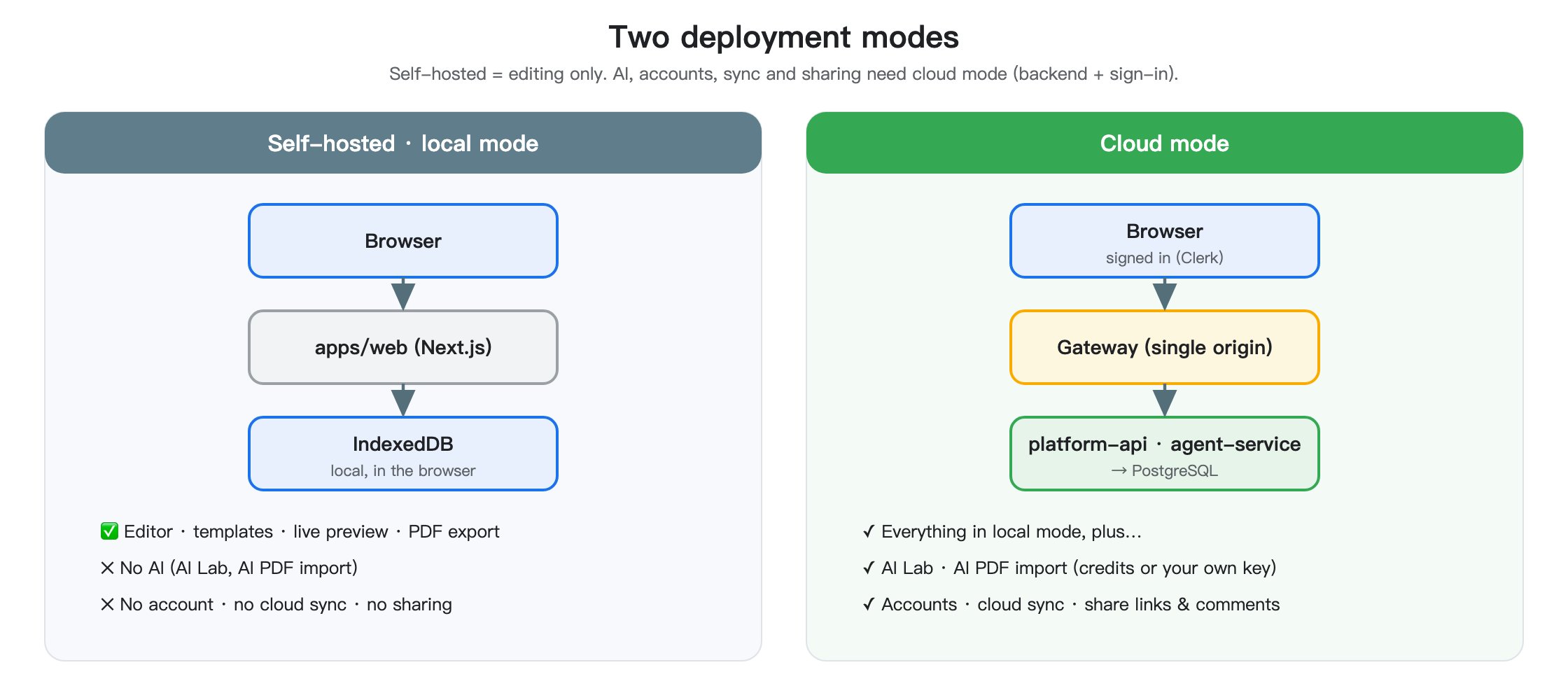 | | `self-hosted` | `cloud` |
| ------------------------------------ | ------------------------------------------------------------ | ------------------------------------------ |
| Default? | Yes | Only with a Clerk key present |
| Auth | None | Clerk (middleware + ``) |
| Storage | IndexedDB only | IndexedDB + Core API |
| AI Lab (interview/translate/analyze) | Disabled unless you point `NEXT_PUBLIC_API_URL` at a backend | Enabled |
| Sharing & version history | Local only | Server-backed |
| Sync indicator | `local` | `saved` / `syncing` / `modified` / `error` |
## Detection
`apps/web/src/lib/config/app.ts` derives the mode at module load:
* If `NEXT_PUBLIC_APP_MODE` is set explicitly → use that.
* Otherwise, if `NEXT_PUBLIC_CLERK_PUBLISHABLE_KEY` is set → `cloud`.
* Otherwise → `self-hosted`.
`apps/web/src/middleware.ts` picks the right middleware at import time:
```ts theme={null}
// pseudo-code, see middleware.ts
export default APP_MODE === 'cloud'
? clerkMiddleware(/* ... */)
: () => NextResponse.next()
```
Because Next.js middleware is bundled per build, this means **changing modes requires a rebuild**, not just an env-var swap on a running server.
## Why a flag, not two apps?
The same React tree, store, and routes run in both modes. Adding a second app would double the surface area without adding behavior. The flag pattern keeps:
* One template gallery
* One editor state machine
* One set of components
…and only switches the **edges** — auth middleware, sync side-effects, AI Lab visibility.
Do not add new runtime mode toggles or local/cloud branches without strong justification. The current split is intentionally narrow. See the [contributing guide](/en/development/contributing).
## Adding a new cloud-only feature
1. Gate the UI on `APP_MODE === 'cloud'` (or a more specific capability flag if it applies to BYO-Clerk users only).
2. Put network calls behind `httpClient.api` so the auth interceptor handles tokens.
3. Make sure the feature degrades gracefully in self-hosted — empty state, not crash.
4. Add a row to the env-var table in [Cloud Mode](/en/getting-started/cloud) if it needs new config.
| | `self-hosted` | `cloud` |
| ------------------------------------ | ------------------------------------------------------------ | ------------------------------------------ |
| Default? | Yes | Only with a Clerk key present |
| Auth | None | Clerk (middleware + ``) |
| Storage | IndexedDB only | IndexedDB + Core API |
| AI Lab (interview/translate/analyze) | Disabled unless you point `NEXT_PUBLIC_API_URL` at a backend | Enabled |
| Sharing & version history | Local only | Server-backed |
| Sync indicator | `local` | `saved` / `syncing` / `modified` / `error` |
## Detection
`apps/web/src/lib/config/app.ts` derives the mode at module load:
* If `NEXT_PUBLIC_APP_MODE` is set explicitly → use that.
* Otherwise, if `NEXT_PUBLIC_CLERK_PUBLISHABLE_KEY` is set → `cloud`.
* Otherwise → `self-hosted`.
`apps/web/src/middleware.ts` picks the right middleware at import time:
```ts theme={null}
// pseudo-code, see middleware.ts
export default APP_MODE === 'cloud'
? clerkMiddleware(/* ... */)
: () => NextResponse.next()
```
Because Next.js middleware is bundled per build, this means **changing modes requires a rebuild**, not just an env-var swap on a running server.
## Why a flag, not two apps?
The same React tree, store, and routes run in both modes. Adding a second app would double the surface area without adding behavior. The flag pattern keeps:
* One template gallery
* One editor state machine
* One set of components
…and only switches the **edges** — auth middleware, sync side-effects, AI Lab visibility.
Do not add new runtime mode toggles or local/cloud branches without strong justification. The current split is intentionally narrow. See the [contributing guide](/en/development/contributing).
## Adding a new cloud-only feature
1. Gate the UI on `APP_MODE === 'cloud'` (or a more specific capability flag if it applies to BYO-Clerk users only).
2. Put network calls behind `httpClient.api` so the auth interceptor handles tokens.
3. Make sure the feature degrades gracefully in self-hosted — empty state, not crash.
4. Add a row to the env-var table in [Cloud Mode](/en/getting-started/cloud) if it needs new config.